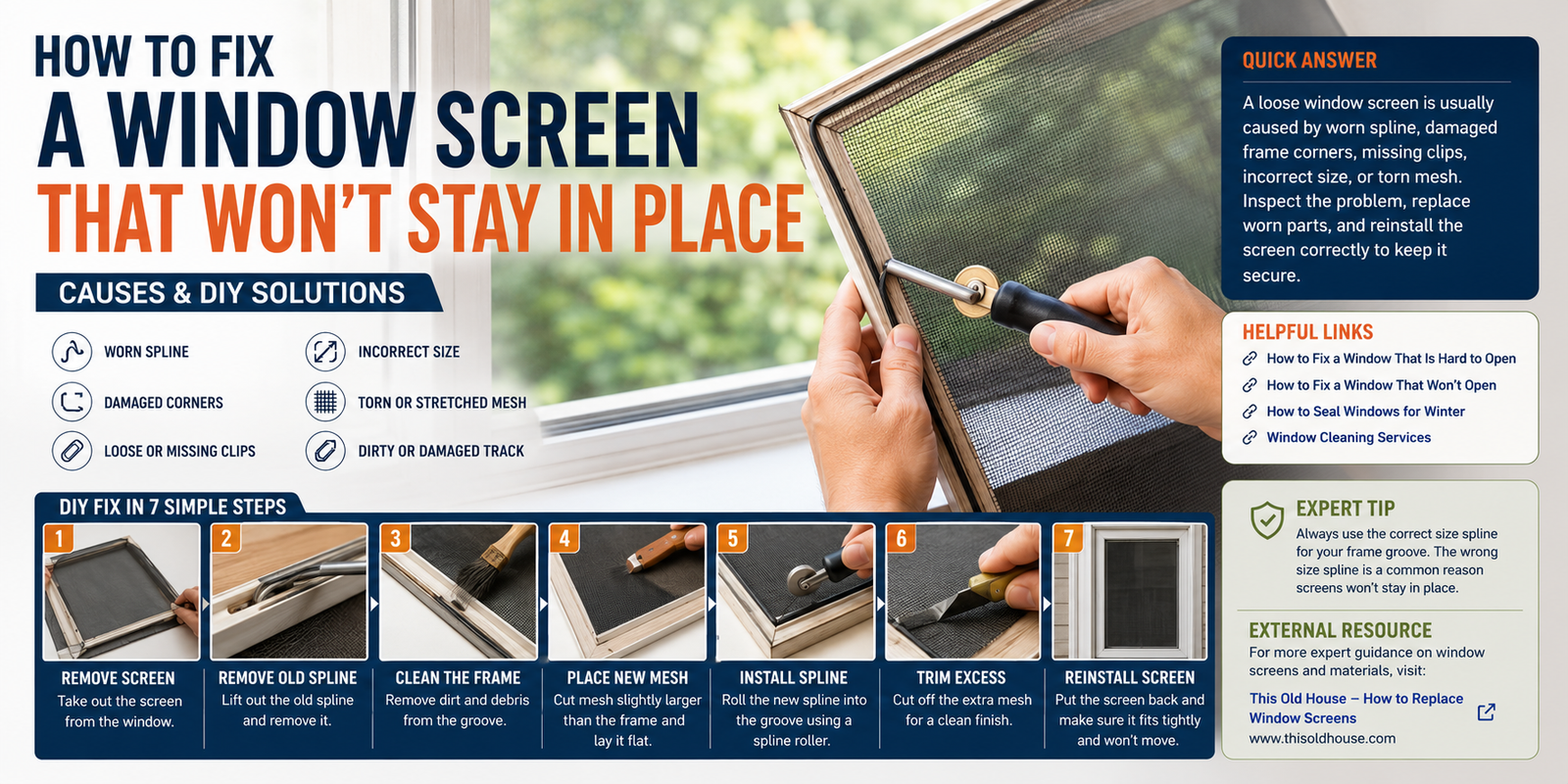
A window screen that keeps popping out, slipping down, or refusing to stay securely in its frame can be surprisingly frustrating. A loose screen also leaves an easy opening for insects, dust, and debris to enter your home.
Fortunately, you usually don’t need to replace the entire window to solve the problem. The screen may simply have a worn spline, damaged frame corners, missing clips, loose tabs, or the wrong size.
In this guide, we’ll explain why a window screen won’t stay in place and show you practical DIY solutions to make it secure again.
Quick Answer
If a window screen won’t stay in place, first check the spline, frame corners, clips, pull tabs, and screen size. Replace worn spline, repair or replace damaged clips, straighten minor frame problems, and make sure the screen fits the opening correctly.
For screens held in a frame with spline, the spline is the flexible cord that locks the mesh into the frame channel.
Why Won’t My Window Screen Stay in Place?
Several problems can cause a window screen to become loose.
Common causes include:
- Worn or loose spline
- Damaged screen-frame corners
- Missing retaining clips
- Broken pull tabs
- Bent frame
- Incorrect screen size
- Torn or stretched mesh
- Loose hardware
- Damaged window track
- Screen installed incorrectly
Before replacing anything, inspect the screen carefully to determine what’s actually causing the movement.
How to Fix a Window Screen That Won’t Stay in Place
1. Check the Screen Size
Start by making sure the screen is actually the correct size for the window opening.
A screen that is slightly too small may move around even when the clips and spline are in good condition.
Check:
- Width
- Height
- Frame depth
- Corner position
- Retaining hardware
Place the screen into the opening and look at the gaps around all four sides.
If you can see a large gap or the frame doesn’t sit firmly against its stops, the screen may simply be the wrong size.
Don’t try to permanently force an undersized screen into place.
2. Inspect the Spline
If your screen uses spline, inspect the material around the entire frame.
The spline is the flexible cord that holds the screen mesh inside the frame groove.
Look for:
- Cracks
- Flattened sections
- Loose areas
- Brittle material
- Missing sections
- Spline that has pulled out of the channel
If the spline is loose, the mesh can easily move or fall out.
Replacing the old spline is often one of the simplest ways to secure the screen again.
3. Replace the Worn Spline
If the spline has lost its ability to hold the mesh tightly, replace it rather than trying to reuse badly damaged material.
You’ll typically need:
- Replacement spline
- Screen roller tool
- Flathead screwdriver
- Utility knife
- Replacement screen mesh if necessary
Remove the old spline carefully.
Then position the screen over the frame and roll the new spline into the groove using the appropriate screen tool.
Lowe’s recommends using a screen tool to roll the spline into the frame channel and notes that the correct spline size depends on the groove and screen material.
Important: Don’t guess the spline size if you can avoid it. Compare the new spline with the old one or measure the frame groove according to the screen manufacturer’s instructions.
4. Check the Screen Frame Corners
Damaged corners can prevent a screen from sitting squarely.
Inspect all four corners for:
- Cracks
- Separation
- Bent sections
- Loose joints
- Missing corner pieces
A slightly separated aluminum frame may allow the screen to shift when you install it.
If a corner is damaged, repair or replace the appropriate frame component rather than repeatedly pushing the screen back into place.
5. Inspect the Screen Clips
Some window screens are held in position with clips, springs, tabs, or other retention hardware.
If a clip is:
- Missing
- Broken
- Bent
- Loose
- Rusted
the screen may not remain securely attached.
Replace damaged clips with compatible hardware.
Don’t rely on tape or improvised fasteners as a permanent repair.
6. Check the Pull Tabs
Many removable screens use small pull tabs to make removal easier.
A broken or missing tab doesn’t always cause the screen itself to fall out, but damaged hardware can sometimes indicate that the screen’s retention system also needs attention.
If the tab is installed into the spline channel, make sure it is positioned correctly before securing the spline.
Some screen systems use tabs that are held in place by the spline itself.
7. Straighten a Slightly Bent Frame
A slightly bent frame may prevent the screen from sitting evenly.
Place the screen on a flat surface and inspect it from different angles.
Look for:
- Bowing
- Twisting
- Bent corners
- Uneven edges
Minor aluminum-frame bends may sometimes be corrected carefully by hand.
However, don’t apply excessive force.
If the frame is badly bent or cracked, replacing it is usually a better option.
8. Check the Window Track
If the screen sits inside a track, inspect the track before assuming the screen itself is damaged.
Remove:
- Dirt
- Leaves
- Dust
- Small stones
- Insect debris
A blocked or damaged track can prevent the screen from seating correctly.
Clean the area thoroughly and test the screen again.
This is also why regular window maintenance matters. Our Window Cleaning Services guide covers broader window-care practices.
9. Replace Torn or Stretched Screen Mesh
Sometimes the frame and hardware are fine but the mesh itself has become damaged.
Look for:
- Holes
- Tears
- Loose mesh
- Stretching
- Frayed edges
- Pet damage
Small holes can sometimes be patched.
Larger tears or badly stretched mesh are usually better candidates for replacement.
Lowe’s notes that small holes can be repaired with screen patches, while larger damage may justify replacing the screen material or entire screen.
For our next Window Repair Hub article, we’ll cover how to repair a torn window screen in more detail.
10. Reinstall the Screen Correctly
After repairing the screen, reinstall it carefully.
Make sure:
- The top edge is properly seated.
- The bottom edge sits in its track.
- All clips or tabs engage correctly.
- The screen is not twisted.
- There are no large gaps around the frame.
Don’t push excessively hard on the mesh itself.
Apply pressure to the frame rather than the delicate screen material.
How to Replace Window Screen Spline
If the spline is the main problem, replacing it is relatively straightforward.
Step 1: Remove the Screen
Take the screen out of the window and place it on a clean, flat work surface.
Step 2: Remove the Old Spline
Use a flathead screwdriver or suitable removal tool to lift the old spline from the channel.
Pull it out carefully.
Step 3: Remove Damaged Mesh
If you’re replacing the entire screen, remove the old mesh.
If the mesh is still usable, keep it positioned correctly over the frame.
Step 4: Position the New Screen
Lay the screen material over the frame with enough overlap around the edges.
Keep the mesh straight.
Step 5: Install the Spline
Use a screen roller to press the spline into the groove.
Work carefully around the frame.
Lowe’s installation guidance recommends using the roller to press the spline into the channel while keeping the screen properly positioned.
Step 6: Trim the Excess
Once the spline is completely installed, carefully trim the excess screen material with a utility knife.
Keep the blade controlled and cut away from your body.
Step 7: Reinstall the Screen
Put the repaired screen back into the window and check that it sits securely.
What If the Screen Keeps Falling Out?
If you’ve already replaced the spline and the screen still falls out, check the retention hardware.
Look at:
- Clips
- Springs
- Pull tabs
- Frame corners
- Track
- Screen dimensions
The problem may not be the screen mesh itself.
A screen that is too small cannot be made secure simply by installing new spline.
What If Only One Corner Keeps Popping Out?
If one corner repeatedly comes loose, inspect that specific area first.
Possible causes include:
- Bent corner
- Damaged clip
- Loose frame joint
- Incorrect installation
- Uneven window opening
- Damaged track
Don’t keep pushing the corner back into place without fixing the underlying problem.
Repeated movement can eventually damage the frame or screen.
Can Weather Affect a Window Screen?
Yes.
Outdoor screens are exposed to:
- Heat
- Cold
- Rain
- Humidity
- Sunlight
- Wind
Over time, these conditions can contribute to material aging.
If your screen is becoming loose after several seasons, inspect the spline and frame rather than assuming the entire window needs replacement.
If you’re also dealing with air leakage around the window itself, see our guide on How to Seal Windows for Winter.
How to Prevent a Window Screen From Coming Loose
A little maintenance can extend the life of your screen.
Regularly:
- Clean the screen.
- Inspect the spline.
- Check frame corners.
- Test clips.
- Clean the window track.
- Look for tears.
- Check pull tabs.
- Make sure the frame remains square.
Avoid leaning heavy objects against the screen.
If you have pets, consider a stronger screen material designed to withstand additional wear.
Common Mistakes to Avoid
Using the Wrong Spline
A spline that doesn’t fit the frame groove properly may not hold the screen securely.
Stretching the Mesh Too Much
Overstretching the mesh can distort the frame or create an uneven screen.
Ignoring a Bent Frame
A damaged frame can make a new screen installation fail repeatedly.
Using Improvised Clips
Tape, wire, or unsuitable fasteners may temporarily hold a screen but aren’t a reliable long-term solution.
Pulling on the Mesh
Always handle the frame when removing or installing a screen.
Pulling directly on the mesh can cause stretching or tears.
When Should You Replace the Entire Screen?
Consider replacing the entire screen if:
- The frame is badly bent.
- Multiple corners are damaged.
- The mesh is extensively torn.
- The spline channel is damaged.
- Retention hardware is no longer available.
- The screen is badly corroded.
- The frame no longer fits the opening.
If the existing frame is still in good condition, however, replacing only the mesh and spline may be enough. Lowe’s notes that replacement screen material can often be installed using an existing frame.
Contractor’s Tip
If a screen keeps popping out after you’ve pushed it back into place several times, don’t keep repeating the same repair.
Remove the screen and inspect the spline, corners, clips, and frame.
In most cases, one of those components is allowing the screen to move.
Finding that cause first will give you a much more durable repair.
Final Thoughts
A window screen that won’t stay in place is usually a manageable DIY problem.
Start by checking the screen size, spline, frame corners, clips, and track. If the spline is worn, replace it with the correct size and use a screen roller to secure it properly.
If the frame is bent or badly damaged, repairing individual components may not be enough.
The goal isn’t simply to push the screen back into position. The goal is to make sure the frame, mesh, spline, and retention hardware all work together to keep it securely in place.
FAQs
Why does my window screen keep falling out?
The most common causes are worn spline, damaged clips, bent frame corners, incorrect screen size, or a damaged track.
How do I keep a window screen from popping out?
Check the spline and retention hardware first. Replace worn spline, repair damaged clips, and make sure the screen fits the opening correctly.
What holds a window screen in place?
Depending on the design, a screen may be held by spline, clips, springs, tabs, latches, or a combination of these components.
Can I replace the spline without replacing the screen?
Yes. If the screen mesh and frame are still in good condition, replacing the spline may be all you need.
How do I know what size spline I need?
Compare the old spline with replacement options or follow the screen/frame manufacturer’s sizing instructions. The correct size depends on the frame groove and screen material.
Can a bent screen frame be repaired?
Minor bends may sometimes be corrected carefully, but severely damaged or twisted frames are usually better replaced.
Why does only one corner of my screen keep popping out?
A damaged corner, loose clip, bent frame, poor fit, or track problem may be responsible.
Can I repair a torn window screen?
Yes. Small holes can often be patched, while larger tears may be better repaired by replacing the screen mesh.
How often should I inspect window screens?
Inspect them at least once or twice a year and whenever you notice movement, gaps, tears, or damaged hardware.